Oriha Calendar
Oriha Calendar feature list
The features in the app, grouped by area.
←Back to the Oriha Calendar pageDisplay: how the calendar looks
Month view (horizontal)
Swipe left or right to move between months. Infinite scrolling that follows your finger.
Month view (vertical)
Months joined together, read vertically.
Week timeline
Seven days on a time axis. Overlaps are split into columns automatically.
Day timeline
One day on a time axis.
List view
Read your events in date order.
Year view
All 12 months at a glance. Days with events get a dot.
Two panes (month and day list)
The month above, the events for that day below. Drag the divider to change the ratio.
Rokuyo, holidays, week numbers
Japanese calendar notations are shown by default (show or hide them in settings).
Custom holidays
Add your own days off, or turn a default holiday back into a working day.
Multi-day bands
Events that span several days are drawn as bands (lanes assigned automatically).
Pinch to zoom the time axis
Pinch the week and day timelines to change the height of one hour (saved when you let go).
Events and tasks
Create and edit events
A drum-style date and time picker, all-day, location, details.
Recurrence
Daily, weekly, monthly, yearly, and more.
Tasks (iOS Reminders)
Works with the Reminders app on iOS.
Repeating reminders
Reminders of its own, inside the app.
Templates, copy and paste
Call up an event you use often and drop it in.
Drag and drop to move or copy
Long-press, then drag to another day or another time.
Long-press action menu
Open, edit, delete, copy, move, template.
Search and filter
Searches across titles, locations, details and memos. Upper and lower case, and full-width and half-width, are not distinguished.
Per-event color
Change the color of an individual event.
Open a map from the location
Tap the location of an event to go to a map app (you can choose the app).
Siri and Shortcuts
Phrases such as create an event in Oriha, from Siri or Shortcuts.
Notifications and alarms
Event notifications
Set more than one alert, minutes or hours before.
Daily digest
A morning and evening notification that gathers the events for today.
Alarm alerts
Rings until you stop it, through lock, silent mode and Focus (iOS 26 or later; for repeating events, the next few occurrences are covered).
Integrations with other services
iOS calendar integration (EventKit)
Read and write the iCloud, Google and Exchange calendars already set up on your iPhone.
Direct Google Calendar link
Connects directly to Google and syncs both ways.
For how your data is handled, please see the privacy policy.
Read the privacy policyMemos and sticky notes, unique to Oriha
Memos (after the fact)
Minutes after a meeting, or a diary for the day. The first line becomes the heading.
Memo list (vertical)
Every day of the month laid out vertically. Swipe left or right to change months.
Attachments (photos, PDFs, video)
Attach photos, PDFs and video to a memo. Video is compressed automatically.
Attachment grid
Browse just the attachments like a photo app, and jump from there to the memo they belong to.
Sticky notes
Put a color label on a date (shifts, duty rotations and so on), with a same-day or day-before notice.
Taking it with you, and backups
Memo export (ZIP)
A ZIP with the photos included. Open index.html inside it in a browser and read it as it is.
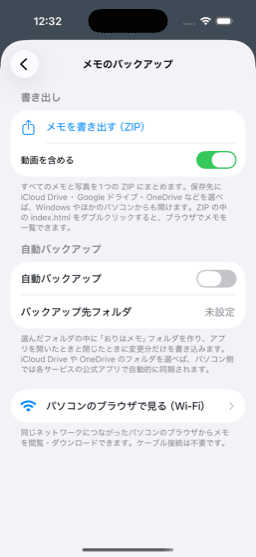
Automatic folder backup
Mirrors the differences to a folder such as iCloud Drive.
Wi-Fi sharing
View and download memos from a PC browser on the same network. The connection is not encrypted, so use it only on a network you trust.
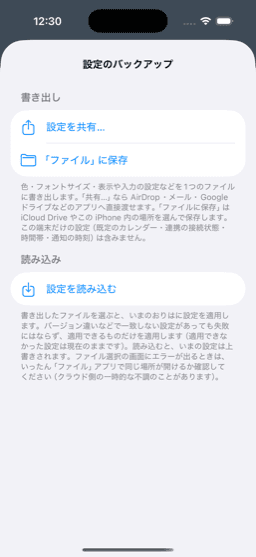
Settings backup
Write colors, fonts and display settings out to a single file, and read them back.
Attachments and storage
Shows how much space is used by type. Tidy up starting from the largest attachments.
AI assistant
Manage events in plain language
Say something like a meeting tomorrow at 3 pm to create, search, edit, or analyze free time.
Voice input
You can give instructions by voice too.
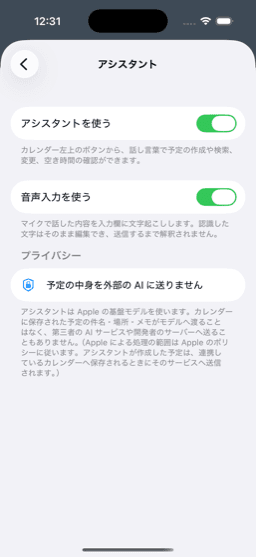
On-device
Apple Foundation Models. The contents of your events are not sent to an external AI.
For how your data is handled, please see the privacy policy.
Read the privacy policyEvents from photos
Turn a paper notice into an event
Photograph a school handout or a notice, and the date and time, location and title are read from it.
Review screen
Check what was read, and tap a line to reassign it.
Widgets
Home screen widget
Small is the today view, medium is 2 weeks, large and extra large are N weeks from the week that contains today (5 weeks by default, 2 to 6 by long-press).
Lock screen widget
Shows the events for today on the lock screen (circular, rectangular and inline).
Customizing the look
Build your own palette
Change colors role by role, separately for light and dark.
Font size
Adjust the size per view mode and per element (date, event, weekday and so on).
Row height and pane ratio
You decide the information density.
Rearrange the toolbar
Put only the view modes you use on the tab bar.
Time zone
Choose to follow your current location, or to fix it to a particular time zone.
Requirements
| Minimum iOS | iOS 17.0 |
|---|---|
| Devices | iPhone / iPad (Split View supported) |
| Alarms | iOS 26 or later |
| Language | Japanese |
How your data is handled
Microphone, speech, and camera recognition are processed on your device. Oriha sends your events to the calendar accounts you added in iOS (iCloud, Google, and so on) and to Google sync if you enable it — we run no server of our own. If you use iOS backups, your data is included there too. Event titles also appear in notifications and widgets.
Read the privacy policyA tool for your days — coming soon.
Launching soon on the App Store. You'll be able to download it right from this page.